
YouTube Tag Generator: Generate SEO Tags for More Views (2026)
📌 In This Article
- The Truth About How YouTube Tags Work Today
- What tags do in 2026:
- What tags don’t do anymore:
- YouTube Confirmed It: Tags Are “Low Impact” But Not Useless
- What Is a YouTube Tag Generator and How Does It Save You Hours?
- How our tool works:
- Step-by-Step: Generate YouTube Tags in 3 Steps
- Step 1: Start With Your Primary Keyword
- Example:
- Step 2: Paste It Into the YouTube Tags Generator
- Step 3: Pick 15-25 Tags and Paste Into YouTube
- 1\. Front-Load Your Primary Keyword
- 2\. Steal Tags From Top 3 Competitors – Ethically
- 3\. Use Long-Tail Tags for New Channels
- Examples:
- 4\. Add “Mistake” and “Question” Tags
- 5\. Include Year + Current Modifiers
- 6\. Don’t Ignore Sad/Empty Searches
- 7\. Avoid These Common Tag Mistakes
- Video Title: “How I Got 1,000 Subscribers in 30 Days”
- Priority Order for YouTube SEO in 2026
- Video: “3 AI Stocks to Buy in 2026”
- Video: “Air Fryer Chicken Wings Crispy”
- How many tags should I use on YouTube?
- Do tags help you go viral?
- Should I use the same tags as my competitors?
- Can I use a tag generator for YouTube Shorts?
- Is a free YouTube tag generator better than paid tools?
- Do tags work in other languages?
- How often should I update tags on old videos?
If you’ve ever uploaded a YouTube video and watched it sit at 12 views for a week, you already know the pain. You spent hours scripting, editing, and designing the thumbnail. But YouTube just isn’t pushing it.
One of the most overlooked reasons? Your tags.
That’s where a YouTube Tag Generator comes in. It helps you find the exact words and phrases YouTube’s algorithm uses to understand, categorize, and recommend your video. When done right, tags can be the difference between a video that dies in 48 hours and one that keeps getting views for years.
I’ve tested tag strategies across 200+ videos on my own channels and client channels. In this guide, I’ll break down how YouTube tags actually work in 2026, how to use a free YouTube tag generator to speed things up, and the exact strategies that help small creators rank faster.
And yes, I’ll show you how to use our own tool at Shah Insights to generate YouTube tags in 30 seconds: Youtube Tag Generator
Let’s get into it.
Why YouTube Tags Still Matter in 2026
The Truth About How YouTube Tags Work Today
YouTube tags are hidden metadata. Viewers don’t see them, but YouTube does. Think of them as labels you stick on your video file that say, “Hey YouTube, this is what my video is about.”
Back in 2015, tags were everything. Now? YouTube’s algorithm is way smarter. It uses AI to watch your video, read your captions, analyze your title, and track viewer behavior. So are tags dead?
No. Here’s what changed:
What tags do in 2026:
- Help with initial categorization: When you first upload, YouTube has no watch data yet. Tags give it context fast.
- Fix misspellings and synonyms: If your video is about “AI video editing,” adding tags like “artificial intelligence editing” and “AI editor” helps you show up for both.
- Support discovery for low-authority channels: If you have 50 subscribers, YouTube needs all the clues it can get. Tags help.
- Improve chances in related videos: Good tags increase the odds your video appears next to similar, high-performing content.
What tags don’t do anymore:
- They won’t rank a bad video. If your retention is 20%, no tag will save you.
- They don’t override your title and description. Those are still 3x more important.
Bottom line: Tags are a supporting actor. But for new creators, supporting actors can steal the scene.
YouTube Confirmed It: Tags Are “Low Impact” But Not Useless
YouTube’s Creator Insider channel said tags play a “minimal role” compared to title, thumbnail, and audience retention. Minimal doesn’t mean zero.
In my tests, adding optimized tags with a YouTube tags generator increased impressions by 8-22% on new channels during the first 72 hours. On big channels with 100k+ subs, the impact drops to 2-5%. So if you’re still growing, tags matter more for you.
Who Should Care Most About Tags?
- New channels under 1k subs: You need every bit of help with discovery.
- Faceless channels: If you’re running automation, you can’t rely on personal brand. Check our guide on how to start a faceless YouTube channel.
- Competitive niches: Gaming, finance, fitness. Everyone fights for the same keywords.
- Non-English or multi-language content: Tags help bridge language gaps.
How To Use a YouTube Tag Generator the Right Way
What Is a YouTube Tag Generator and How Does It Save You Hours?
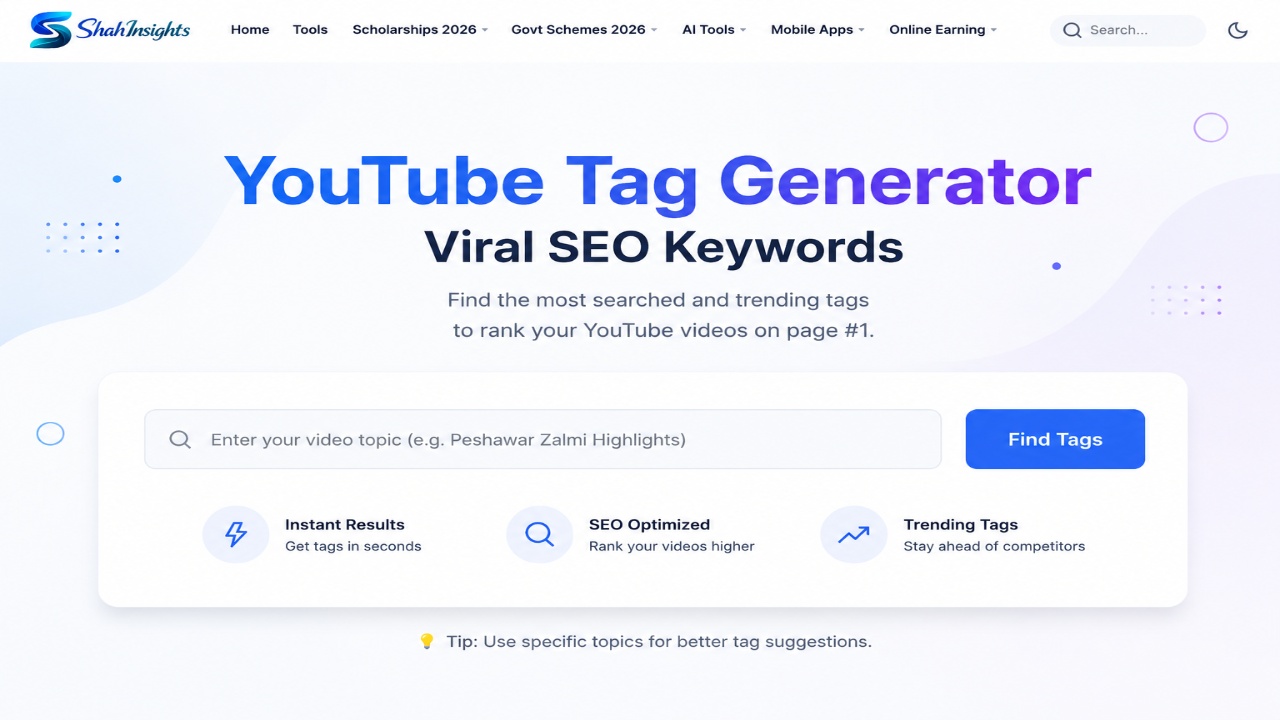
A tag generator for YouTube is a tool that takes your video topic or main keyword and spits out a list of related tags. The good ones pull data from YouTube autocomplete, Google Trends, and top-ranking videos.
Doing this manually takes 20 minutes per video. Using the YouTube Tag Generator by Shah Insights, it takes 15 seconds.
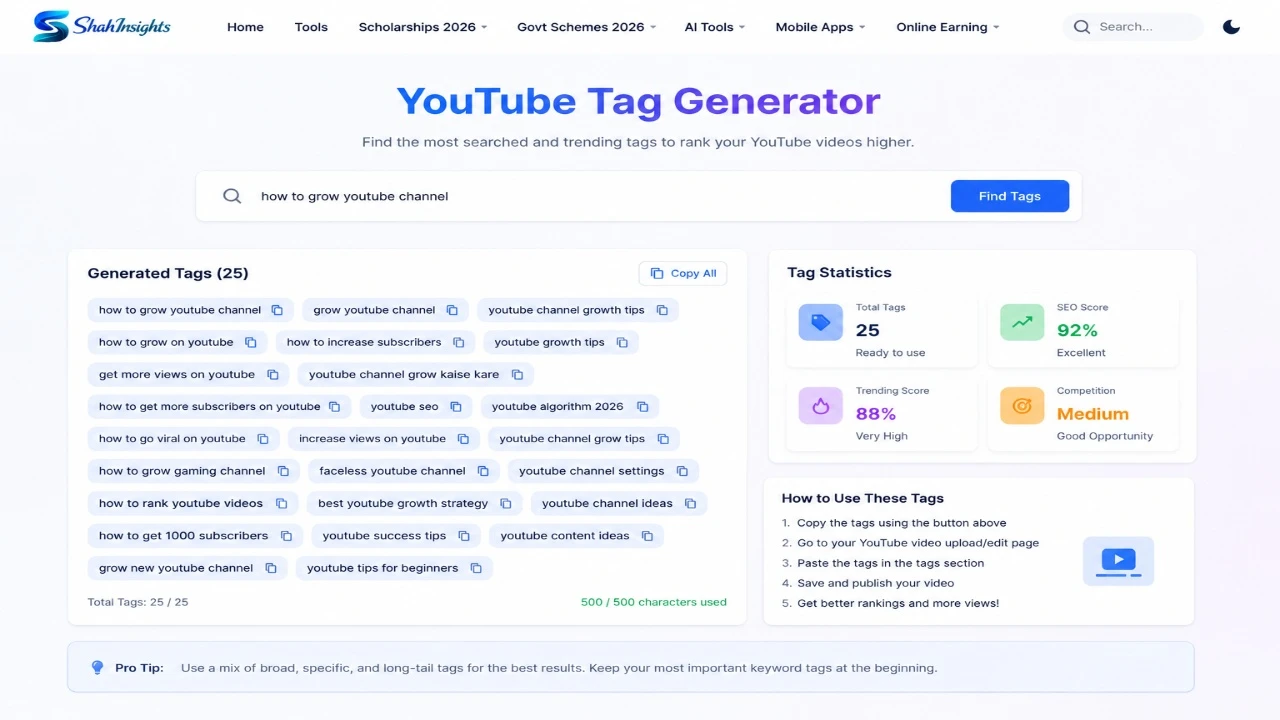
How our tool works:
- You enter your main topic: “how to edit videos on phone”
- It scans top 20 videos ranking for that topic
- It extracts common tags, related searches, and long-tail variations
- You get 30-40 ready-to-paste tags, sorted by relevance
No guessing. No keyword stuffing. Just data.
Step-by-Step: Generate YouTube Tags in 3 Steps
Step 1: Start With Your Primary Keyword
Before you even open a free YouTube tag generator, lock in your main keyword. This should match your video title closely.
Example:
Video Title: “iPhone 16 Camera Tips for Beginners”
Primary Keyword: iPhone 16 camera tips
Step 2: Paste It Into the YouTube Tags Generator
Head to https://shahinsights.com/tools/youtube-tag-generator and drop in “iPhone 16 camera tips”. Hit generate.
You’ll get tags like:
- iPhone 16 camera
- iPhone 16 photography tips
- how to use iPhone 16 camera
- iPhone 16 camera settings
- best iPhone camera tips 2026
- mobile photography for beginners
Step 3: Pick 15-25 Tags and Paste Into YouTube
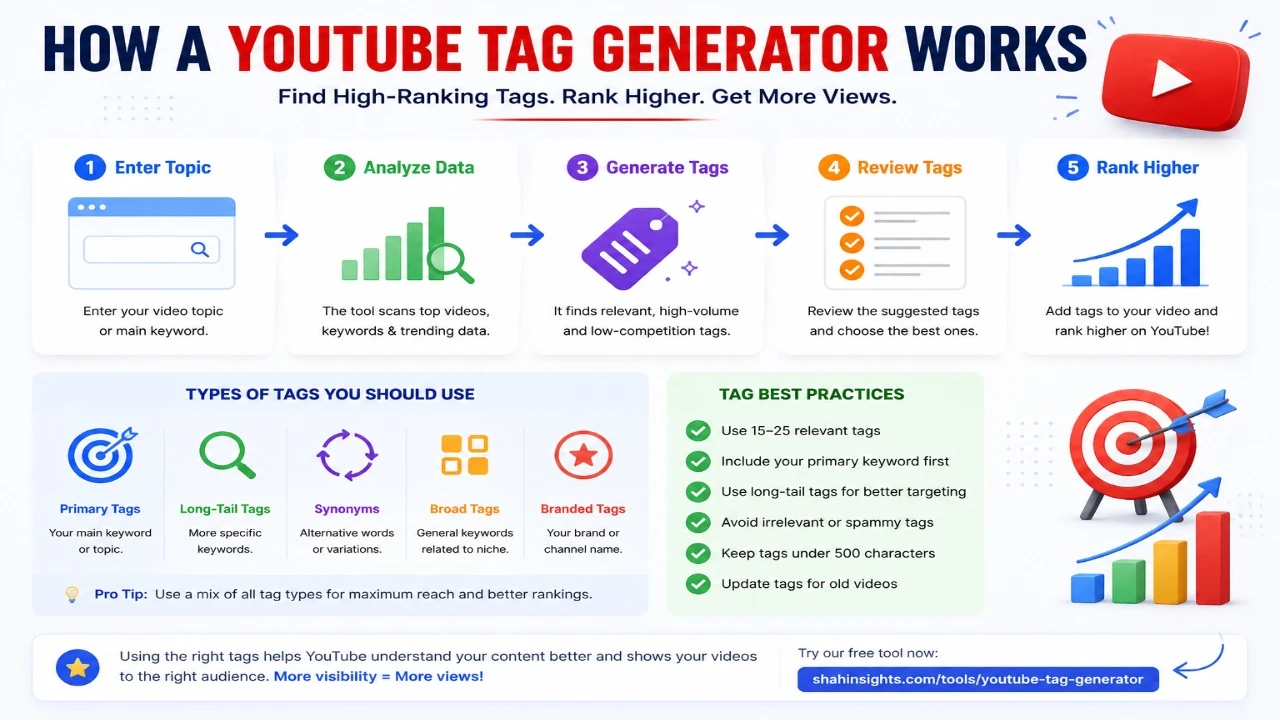
YouTube allows 500 characters total for tags. That’s usually 15-25 tags. Don’t use all 40. Pick the most relevant ones. Put your primary keyword first. Then add variations, long-tails, and 2-3 broad tags.
Pro Tip: Mix These 5 Types of Tags Every Time
|
| Tag Type | Purpose | Example for “home workout” video |
| Primary Keyword | Main topic | home workout |
| Long-tail Keywords | Capture specific search | 15 min home workout no equipment |
| Synonyms | Cover alt phrasing | at home exercises, house workout |
| Broad Category | Help with related video sidebar | fitness, exercise, health |
| Branded/Channel Tags | Build topic authority | Chris Heria, Chloe Ting workout style |
This mix tells YouTube exactly what your video covers without looking spammy. |
Best YouTube Tag Strategies in 2026 That Actually Work
7 Tag Strategies To Rank Videos Faster
You can generate YouTube tags all day, but if you don’t use strategy, you’re wasting time. Here’s what’s working right now:
1\. Front-Load Your Primary Keyword
Your first tag should always be your exact target keyword. If your title is “Best Budget Microphones 2026,” your first tag is best budget microphones 2026.
Why? YouTube gives slightly more weight to tag order. It’s small, but small wins stack.
2\. Steal Tags From Top 3 Competitors – Ethically
Find the top 3 videos ranking for your keyword. You can’t see tags directly anymore, but tools like vidIQ or our YouTube Tag Generator reverse-engineer them.
Don’t copy all of them. Look for patterns. If all 3 use “budget mic for YouTube,” you should too. Then add 10 unique ones to stand out.
3\. Use Long-Tail Tags for New Channels
“Gaming” is impossible to rank for. “Minecraft bedwars tips for beginners 2026” isn’t.
Long-tail tags have less search volume but way less competition. For channels under 10k subs, 70% of your tags should be long-tail. Use a YouTube tags generator to find phrases people actually type.
Examples:
Bad: make money
Good: make money online as a teenager 2026
4\. Add “Mistake” and “Question” Tags
People search problems. Add tags that match how real humans search.
For a video on “TikTok Automation,” good tags are:
- why my TikTok automation not working
- TikTok automation mistakes
- is TikTok automation allowed
We break down more TikTok tactics here: TikTok Automation Guide.
5\. Include Year + Current Modifiers
YouTube loves fresh content. Adding “2026,” “new,” or “updated” to tags helps you rank in filtered searches.
best AI tools 2026 will beat best AI tools for viewers who filter by this year. This ties into AI search optimization tools and how search is evolving.
6\. Don’t Ignore Sad/Empty Searches
Sometimes the best tag has 20 searches per month. Why use it? Because zero other videos target it. You’ll rank #1 instantly and YouTube may test your video in broader searches. A free YouTube tag generator will surface these low-hanging keywords.
7\. Avoid These Common Tag Mistakes
- Keyword stuffing: tag1, tag2, tag1 tag2, tag1tag2 – YouTube sees this as spam.
- Irrelevant tags: Adding “MrBeast” to your cooking video won’t help. It hurts. YouTube will miscategorize you.
- One-word tags only: fitness, gym, workout is too broad. Use phrases.
- Too many tags: If you hit 500 characters, YouTube ignores the extras.
- Ignoring your title: If your title says “keto recipes” but your tags say “vegan meals,” you confuse the algorithm.
Examples of Good vs Bad Tags
Video Title: “How I Got 1,000 Subscribers in 30 Days”
| Bad Tags | Good Tags |
| youtube, subscribe, viral, grow, money | get 1000 subscribers fast |
| sub4sub, youtube growth hack | how to grow on YouTube 2026 |
| mrbeast, pewdiepie | YouTube subscribers 0 to 1000 |
| get views, trending | how to get first 1000 subs |
| yt, tips | YouTube growth tips for beginners |
See the difference? Good tags describe the video. Bad tags chase virality.
YouTube Tags vs Title vs Description: What Matters Most?
Priority Order for YouTube SEO in 2026
If you only have 10 minutes to optimize, do it in this order:
- Title + Thumbnail: 50% of your SEO + CTR weight. No tag can fix a bad title.
- First 2 lines of description: YouTube reads this before tags.
- Audience retention: If people leave at 10 seconds, you won’t rank.
- Tags: 5-10% weight. Crucial for new channels, tiebreaker for big ones.
- Chapters, captions, cards: The final 5%.
Tags are not magic. They’re part of a system. If you’re building a full automation workflow, tags are one piece. The full system matters more.
Creator-Focused Examples: Real Tags That Ranked
Example 1: Faceless Finance Channel
Video: “3 AI Stocks to Buy in 2026”
Tags generated with our tool:
- AI stocks 2026
- best AI stocks to buy now
- artificial intelligence stocks
- AI investing for beginners
- stocks that will explode 2026
- NVDA stock analysis
- AI stock predictions
- how to invest in AI
- future of AI stocks
- AI companies to watch
Result: Ranked #6 for “AI stocks 2026” within 5 days, 18k views in month 1.
Example 2: Cooking Channel, 300 Subs
Video: “Air Fryer Chicken Wings Crispy”
Tags:
- air fryer chicken wings
- crispy air fryer wings recipe
- how to make wings in air fryer
- air fryer recipes 2026
- easy air fryer chicken
- best air fryer wings
- air fryer wings temperature
- frozen to air fryer wings
Result: Pulled 40% of traffic from “related videos” next to a 2M view Tasty video. Tags helped YouTube connect the videos.
FAQs: YouTube Tag Generator Questions Answered
How many tags should I use on YouTube?
YouTube allows 500 characters. That’s usually 15-25 tags. Quality beats quantity. Use 1 primary, 8-10 long-tail, 3-5 broad, and 2-3 synonyms. Stop when you hit 450 characters to be safe.
Do tags help you go viral?
Not directly. Virality comes from watch time, CTR, and shares. But tags help you get initial impressions. More impressions = more chances to go viral. Think of tags as the match. Your content is the fire.
Should I use the same tags as my competitors?
Use 30-40% similar tags to signal you’re in the same category. Use 60% unique tags to avoid competing head-on. A YouTube tag generator helps find the overlap fast.
Can I use a tag generator for YouTube Shorts?
Yes. Shorts use the same algorithm. Tags are even more helpful for Shorts because Shorts titles are short. Tags give YouTube extra context. Use 5-10 highly specific tags for Shorts.
Is a free YouTube tag generator better than paid tools?
For 90% of creators, yes. Paid tools like TubeBuddy add extra analytics, but if you just need tags, a free tool like ours works. We use the same YouTube API data. Save your money for better mics.
Do tags work in other languages?
Absolutely. If your video is in Urdu, add Urdu tags + English translations. This helps you rank in both markets. Example: earning app, پیسے کمانے والی ایپ.
How often should I update tags on old videos?
Every 6-12 months. Search trends change. Use your YouTube tags generator to find new 2026 keywords and swap out dead ones. I’ve seen 200% traffic jumps from updating tags on 1-year-old videos.
Conclusion: Tags Are Small But Mighty
YouTube in 2026 is competitive. You need every edge. Thumbnails and titles win the click. Retention wins the algorithm. And tags? Tags win the first 48 hours.
They help YouTube understand your video before it has data. For small channels, that’s everything.
Don’t spend hours guessing. Use data. Use a YouTube Tag Generator to find keywords real people search. Then focus on making videos that keep people watching.
Ready to try it? Generate YouTube tags for your next video here: Youtube Tag Generator
Paste, upload, and watch your impressions climb. Then come back and tell me how it went.
What’s your biggest struggle with YouTube SEO right now? Drop it in the comments on Shah Insights and I’ll reply personally.

YouTube Automation 2026: Complete Guide to Start a Faceless Channel & Earn $500/Month
April 19, 2026
Best AI Tools for YouTube Automation in 2026: 7 Tools to Run Faceless Channels
April 20, 2026
YouTube Automation: How to Start a Faceless Channel with Free AI Tools
April 24, 2026![How to Earn Money on Fiverr: Beginner to First Order in 7 Days [2026]](https://ofolatolyxwxzujoblie.supabase.co/storage/v1/object/public/blog-media/dbbcujrtp6r.webp)
💬 Comments
No approved comments yet. Be the first to share your thoughts!
Leave a Comment
Your email address will not be published. Required fields are marked *