
What Is Claude Code? Complete Beginner Guide to Anthropic’s AI Tool (2026)

📌 In This Article
- AI Tools Are Moving Beyond Chatbots
- Claude Code Is Not Just for Developers
- You Describe Tasks in Natural Language
- What Makes Claude Code Different?
- Strong Context Understanding
- Beginners Are Using It Too
- Is Claude Code Free?
- Why People Are Switching To AI Workflows
- Saves Time
- Improves Productivity
- Helps Beginners Learn Faster
- Reduces Repetitive Work
- Speeds Up Content Creation
- AI Still Needs Human Input
- AI Is Changing Workflows, Not Eliminating Everything
- Smart Use Cases for Beginners
- For Bloggers
- For Students
- For Developers
- For Businesses
- AI Assistants Will Become Everyday Tools
AI tools are evolving fast in 2026, but very few tools are creating as much discussion as Claude Code.
Over the past few months, developers, creators, startup founders, students, marketers, and even non-technical users have started using Claude Code for everything from writing and automation to research and productivity.
Many people think Claude Code is only for programmers.
That is completely wrong.
Yes, developers use Claude Code heavily for coding tasks, but the tool is now being used for content creation, debugging, automation workflows, data analysis, brainstorming, research, documentation, business ideas, SEO planning, and much more.
In this beginner-friendly guide, we’ll explain what Claude Code is, how it works, what people use it for, its biggest features, pricing, and why it is becoming one of the most talked-about AI tools in 2026.
What Is Claude Code?
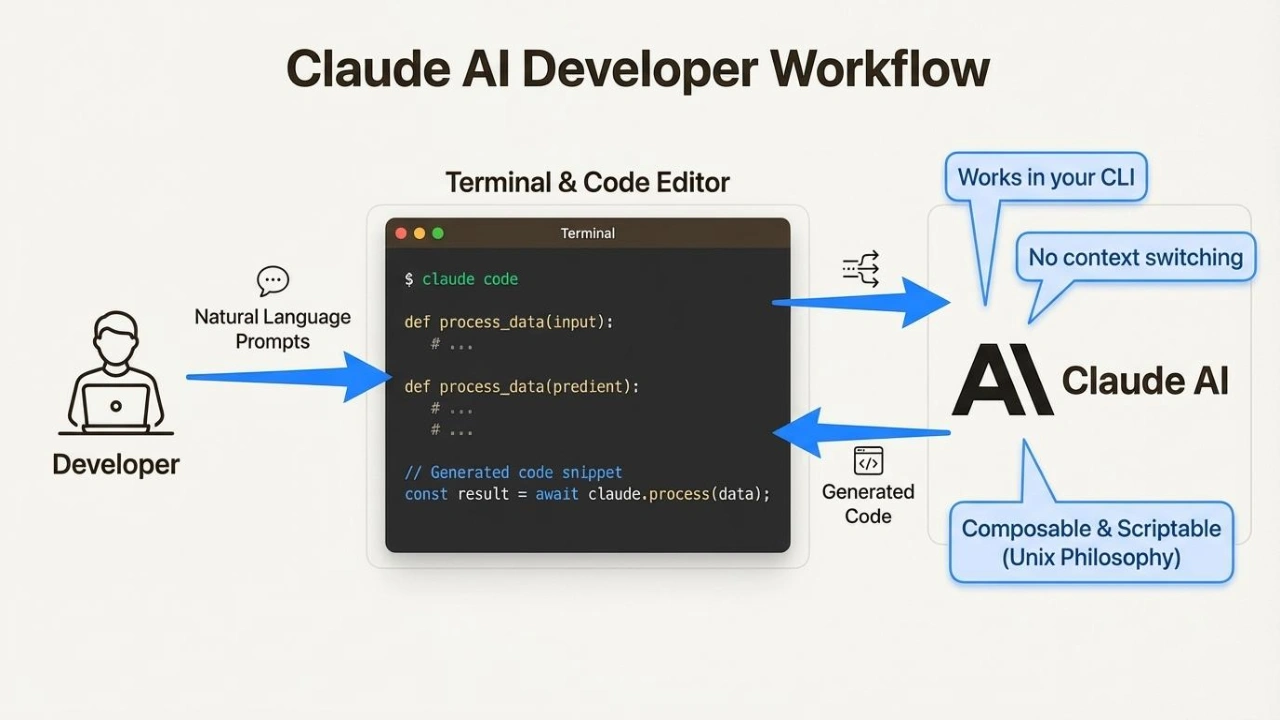
Claude Code is an AI-powered assistant created by Anthropic that helps users complete complex tasks using natural language instructions.
Instead of manually doing everything yourself, you can simply describe what you want, and Claude Code helps generate solutions, ideas, workflows, code, content, explanations, or analysis.
The tool is powered by Claude AI models developed by Anthropic, one of the fastest-growing AI companies in the world.
Claude Code is designed to understand large amounts of context and handle long conversations more effectively than many older AI systems.
This makes it useful not only for coding but also for productivity and creative work.
Why Claude Code Is Becoming Popular in 2026
AI Tools Are Moving Beyond Chatbots
A few years ago, AI tools were mostly simple chatbots.
Now, tools like Claude Code act more like intelligent assistants that can:
- understand instructions
- analyze files
- generate workflows
- explain complex ideas
- create structured content
- solve technical problems
- automate repetitive tasks
Claude Code stands out because it focuses heavily on reasoning, context understanding, and workflow assistance.
Instead of giving short robotic answers, it often produces detailed and structured responses that feel more useful for real work.

What Can Claude Code Actually Do?
Claude Code Is Not Just for Developers
One of the biggest misconceptions is that Claude Code only writes programming code.
In reality, people are using it for dozens of different tasks.
1\. Writing and Content Creation
Content creators and bloggers are using Claude Code to:
- generate article ideas
- improve SEO structure
- create outlines
- summarize long documents
- rewrite content
- brainstorm titles
- create social media captions
- organize research
For example, a blogger can ask Claude Code to create a full SEO structure for a 2000-word article with proper H1, H2, and H3 headings.
Many creators also use it to speed up YouTube scripting and newsletter writing.
2\. Coding and Development
Of course, coding is still one of its strongest features.
Developers use Claude Code for:
- writing code
- fixing bugs
- explaining errors
- improving performance
- generating APIs
- understanding frameworks
- debugging projects
- creating scripts
- learning programming
It supports multiple languages including:
- Python
- JavaScript
- TypeScript
- HTML
- CSS
- React
- PHP
- SQL
- C++
- and more
Even beginner developers can use Claude Code to understand programming concepts faster.
3\. Automation and Productivity
Many people now use Claude Code to automate repetitive work.
Examples include:
- workflow planning
- automation ideas
- spreadsheet formulas
- email drafting
- task organization
- business documentation
- meeting summaries
- productivity systems
Freelancers and agencies especially use it to save time during daily operations.
4\. Research and Learning
Claude Code is also becoming popular among students and researchers.
People use it to:
- summarize PDFs
- explain difficult topics
- simplify technical concepts
- compare information
- generate study notes
- organize learning plans
Because Claude handles large context windows well, it can process longer documents more effectively than many older AI tools.
5\. SEO and Marketing
Digital marketers are heavily using Claude Code in 2026.
Some common use cases include:
- keyword clustering
- SEO article planning
- meta descriptions
- content optimization
- competitor analysis
- marketing copy
- email campaigns
- ad ideas
Many website owners now combine AI tools with manual editing to scale content production faster.

How Claude Code Works
You Describe Tasks in Natural Language
The system works through prompts and instructions.
You simply tell Claude Code what you want.
Example:
“Create a beginner-friendly guide about YouTube SEO with proper headings and FAQs.”
Claude Code then analyzes the request and generates a structured response.
The better your instructions are, the better the output becomes.
This is why prompt engineering is becoming more important in 2026.
Claude Code vs ChatGPT
What Makes Claude Code Different?
A lot of users compare Claude Code with ChatGPT and other AI assistants.
Both tools are powerful, but they focus on slightly different strengths.
| Feature | Claude Code | ChatGPT |
|---|---|---|
| Long context handling | Excellent | Very Good |
| Structured writing | Strong | Strong |
| Coding support | Excellent | Excellent |
| Research summaries | Very Strong | Strong |
| Creativity | Good | Excellent |
| Workflow assistance | Strong | Strong |
| Ease for beginners | Very Good | Very Good |
Many users now combine multiple AI tools depending on the task they are working on.
Why Developers Like Claude Code
Strong Context Understanding
One reason developers love Claude Code is its ability to understand large codebases and long conversations.
Instead of forgetting earlier context quickly, Claude can often maintain better continuity during technical discussions.
This helps when working on:
- large projects
- debugging sessions
- documentation
- app architecture
- API integrations
Developers also like how Claude explains code in simpler language.
Claude Code for Non-Technical Users
Beginners Are Using It Too
You do not need to be a programmer to use Claude Code.
Many users with zero coding knowledge use it for:
- blogging
- productivity
- brainstorming
- business planning
- SEO
- social media
- freelancing
- learning
The interface is designed to feel conversational and beginner-friendly.
This is one reason AI adoption is growing so fast worldwide.
Claude Code Pricing
Is Claude Code Free?
Claude offers both free and paid access depending on usage limits and features.
The free version is enough for many casual users.
However, professional users often upgrade for:
- higher usage limits
- better model access
- improved performance
- advanced workflows
Pricing structures may change over time as AI competition increases in 2026.
Biggest Benefits of Claude Code
Why People Are Switching To AI Workflows
Here are some major reasons people use Claude Code daily:
Saves Time
Tasks that once took hours can now take minutes.
Improves Productivity
Users can brainstorm, organize, and execute faster.
Helps Beginners Learn Faster
Instead of searching through dozens of tutorials, people can ask direct questions.
Reduces Repetitive Work
Automation and AI assistance remove boring repetitive tasks.
Speeds Up Content Creation
Creators and marketers can publish faster while staying organized.
Common Mistakes People Make With Claude Code
AI Still Needs Human Input
Some users expect perfect results instantly.
That is unrealistic.
Claude Code works best when users:
- give clear prompts
- review outputs
- edit final results
- add human creativity
AI tools should assist creativity, not completely replace it.
Is Claude Code Replacing Jobs?
AI Is Changing Workflows, Not Eliminating Everything
This is one of the biggest discussions in tech right now.
AI tools like Claude Code are definitely changing how people work.
However, most professionals are using AI as a productivity tool rather than a complete replacement.
The people benefiting the most are those learning how to combine AI with real skills.
For example:
- writers use AI for outlines
- developers use AI for debugging
- marketers use AI for research
- creators use AI for scripting
Human creativity and decision-making still matter heavily.
Best Ways To Use Claude Code in 2026
Smart Use Cases for Beginners
If you are new to Claude Code, start with simple workflows.
Examples:
For Bloggers
- article outlines
- SEO headings
- FAQs
- keyword ideas
For Students
- study notes
- explanations
- summaries
- learning plans
For Developers
- debugging
- learning frameworks
- script generation
- code explanations
For Businesses
- emails
- documentation
- workflows
- planning
The more you use AI tools, the better you become at giving instructions.
The Future of AI Tools Like Claude Code
AI Assistants Will Become Everyday Tools
AI is moving far beyond simple chatbots.
In the next few years, tools like Claude Code may become part of daily work for millions of people worldwide.
We are already seeing creators, businesses, freelancers, students, and developers integrate AI into normal workflows.
The biggest advantage will go to people who learn how to use AI effectively early.
Final Thoughts
Claude Code is one of the fastest-growing AI tools in 2026 for a reason.
It is no longer just a coding assistant.
People now use Claude Code for:
- writing
- productivity
- automation
- research
- SEO
- content creation
- development
- learning
- workflow management
Its ability to understand context, generate structured responses, and assist with complex tasks makes it useful for both technical and non-technical users.
However, the smartest users are not relying on AI blindly.
They combine AI tools with human creativity, editing, strategy, and experience.
That combination is becoming one of the biggest advantages in the digital world today.
Whether you are a creator, student, freelancer, marketer, or developer, learning AI tools like Claude Code could become an important skill in the future.

YouTube Automation 2026: Complete Guide to Start a Faceless Channel & Earn $500/Month
April 19, 2026
Best AI Tools for YouTube Automation in 2026: 7 Tools to Run Faceless Channels
April 20, 2026
YouTube Automation: How to Start a Faceless Channel with Free AI Tools
April 24, 2026![How to Earn Money on Fiverr: Beginner to First Order in 7 Days [2026]](https://ofolatolyxwxzujoblie.supabase.co/storage/v1/object/public/blog-media/dbbcujrtp6r.webp)
💬 Comments
No approved comments yet. Be the first to share your thoughts!
Leave a Comment
Your email address will not be published. Required fields are marked *